 Live
Live
Are you an SBI customer who is yet to register for Net Banking? You can register for SBI’s net banking from home and the process is completely online. Any tasks like passbook printing, cash withdrawal, Demand draft preparation, cheque-book applications, etc. can be performed easily.
Net banking is secured with your debit card credentials and OTP (One Time Password) to protect the account holder’s money. To register yourself with SBI net banking, you will have to fulfil some conditions:
- Your mobile number must be registered with the bank’s record.
- You must have an active ATM Card.
- Make sure you have not registered for the facility through any SBI branch.
- Joint account holders cannot register for Net Banking online. They will have to visit a branch.
If you have fulfilled these, here’s how to register for SBI Net Banking:
- Visit www.onlinesbi.com

- Click on ‘New User Registration/Activation’
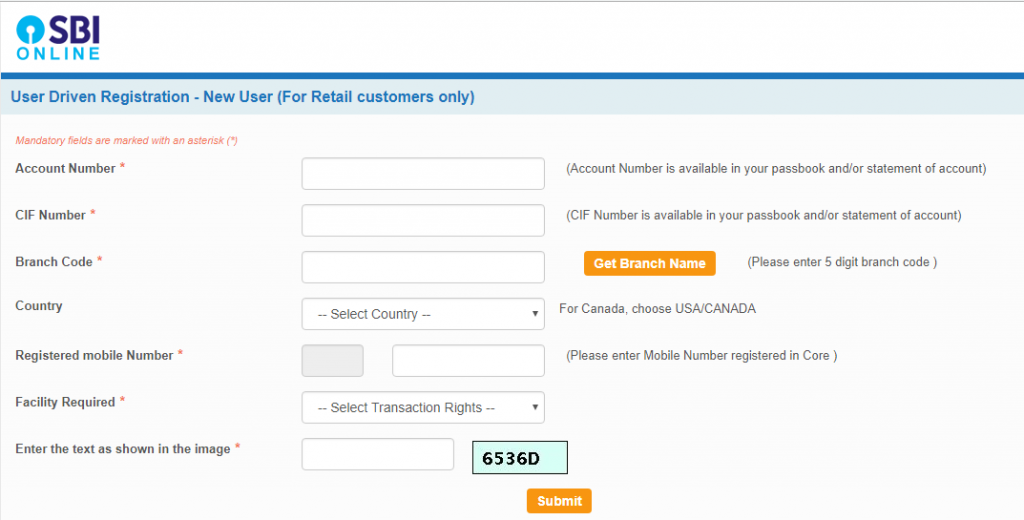
- Enter Account Number, CIF number, branch code, country, registered mobile number, the facility required, and click on the “Submit” button.

- Enter OTP (One Time Password) and Confirm.
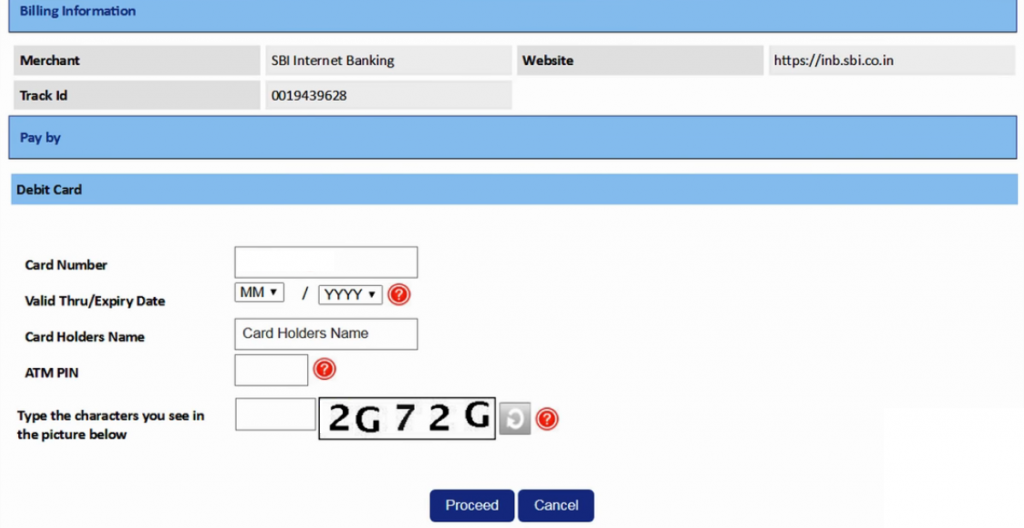
- Select an ATM card to proceed with the activation of the services. If you don’t have an ATM card, your branch will complete the registration process for you.
- Note the temporary username and create a log in password and re-enter the password and click submit to complete the registration process.

- Login with a temporary username and newly created password.
- Create a username of your choice that will be your permanent username.
- Accept terms and conditions and set the login password and profile password and select hint questions and create answers for hint questions.
- Enter the date of birth, place of birth, and registered mobile number.
- Click on the ‘Account Summary’ link to view all accounts mapped with your account.
- If you are registered with ‘View Only Rights’, contact your branch to activate your ‘transaction rights’ with a printout of your online registration process.